FBR digital invoicing has become an important part of tax compliance for businesses in Pakistan. When your ERP, POS, or invoicing software is connected to the Federal Board of Revenue, invoice information must be transmitted in the required electronic format and according to applicable FBR rules.
For businesses using Odoo ERP, Odoo POS, retail software, accounting systems, or custom invoicing applications, an integration problem can quickly become an operational problem.
An invoice may fail to transmit, a transaction may remain pending, tax calculations may be rejected, or the system may return an API error.
The good news is that most FBR integration errors can be diagnosed systematically.
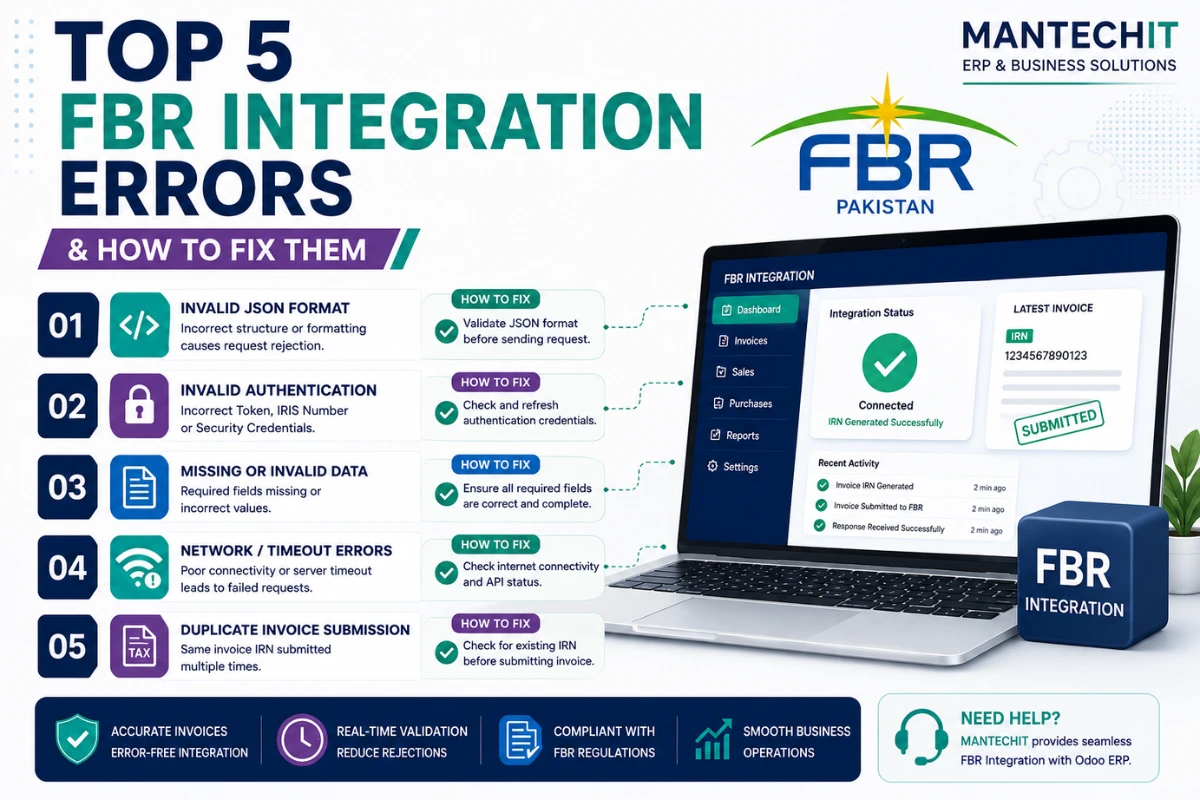
In this guide, we explain the 5 most common FBR integration errors, why they happen, how to troubleshoot them, and how businesses can build a more reliable FBR-connected ERP or POS system.
Important: FBR’s current digital invoicing framework requires notified registered persons to integrate their POS, ERP, or other invoicing systems through a licensed integrator. FBR also maintains an updated list of licensed integrators and provides official technical documentation for API integration.
What Is FBR Integration?
FBR integration connects your business software—such as an ERP, POS, accounting system, or invoicing application—with FBR’s electronic invoicing infrastructure.
Instead of manually entering every transaction into a government portal, the business system can transmit the required invoice information electronically.
A typical workflow looks like this:
Customer Order → Invoice Created → Tax Calculated → Invoice Data Validated → FBR API → FBR Response → Invoice/Reference Information Stored → Receipt Generated
A properly configured integration can reduce manual work, improve invoice accuracy, and make it easier to maintain an electronic audit trail.
FBR provides technical documentation and technical assistance resources for digital invoicing integrations.
1. Authentication, Token or Authorization Errors
One of the most common problems in an FBR integration is an authentication or authorization failure.
Your Odoo, POS, or accounting software may successfully connect to the internet but still be unable to authenticate with the FBR service.
Common Symptoms
You may see messages such as:
- Authentication failed
- Unauthorized
- Invalid token
- Access denied
- Invalid authorization header
- API authentication error
- Request rejected
Why Does This Happen?
Authentication problems can occur because:
- The API credentials are incorrect.
- A token has been changed or is no longer valid.
- Production credentials are being used incorrectly.
- Sandbox/test credentials are being used in a production environment.
- Authorization information was copied incorrectly.
- The integration configuration contains an outdated credential.
- The software is sending the wrong authentication header.
How to Fix FBR Authentication Errors
Start by checking the credentials configured in your ERP or POS.
Step 1: Confirm that you are using the correct FBR environment.
Step 2: Verify the credentials or token provided for the integration.
Step 3: Check the authorization configuration inside your Odoo FBR connector or invoicing software.
Step 4: Make sure there are no accidental spaces or formatting characters in the credential fields.
Step 5: Test the API connection again.
Step 6: Review the integration logs and capture the exact response returned by FBR.
Do not repeatedly change credentials without checking the API response. A proper error log can usually tell you whether the problem is authentication, request validation, connectivity, or another issue.
Odoo FBR Integration Tip
For Odoo users, keep FBR configuration separate from ordinary accounting settings. Document the environment, credentials, company information, POS configuration, and integration status so that troubleshooting does not depend on one employee.
2. Invalid Invoice Data or JSON Validation Errors
Another major category of FBR integration errors occurs when the invoice data sent from your ERP or POS does not match the required structure.
FBR’s digital invoicing integration uses structured electronic data. If required information is missing, incorrectly formatted, or mapped incorrectly, the invoice can be rejected.
FBR publishes technical documentation for its Digital Invoicing API, so developers and integration teams should build their implementation around the current technical requirements rather than relying on an old connector or undocumented assumptions.
Common Causes
Data validation errors can be caused by:
- Missing buyer information
- Incorrect NTN or registration information
- Invalid invoice type
- Incorrect product information
- Missing tax information
- Incorrect quantity or unit
- Invalid date/time format
- Incorrect PCT/HS-related product mapping where applicable
- Incorrect invoice totals
- Unsupported characters or malformed JSON
- Missing mandatory fields
- Incorrect field mapping between Odoo and the FBR API
Example
Suppose a product is correctly configured inside Odoo, but the FBR-specific product or tax information is missing.
The POS may successfully create the invoice internally, but the FBR submission can fail because the API request does not contain the required information.
How to Fix Data Validation Errors
Create a data validation checklist before sending an invoice to FBR.
Check:
- Company information
- NTN/STRN or applicable registration information
- Buyer information
- Product information
- Quantity
- Unit price
- Discount
- Sales tax
- Total amount
- Invoice date
- Invoice type
- Required product classification/mapping
- Payment information
- Any other fields required by the applicable FBR API specification
For developers, log the complete API request and response in a secure system while protecting sensitive credentials.
Best Practice
Do not allow users to freely enter tax-critical information every time they create an invoice.
Instead, configure your ERP so that important fields are controlled through:
- Product master data
- Customer master data
- Tax configuration
- Accounting rules
- Product classification
- Automated validation
This dramatically reduces human errors.
3. Tax Calculation or Tax Rate Mismatch
Tax calculation problems are another common cause of rejected or inconsistent invoices.
Your ERP may calculate a tax amount that does not match the amount expected by the applicable FBR rules or integration specification.
Common Symptoms
Your system may show:
- Tax amount mismatch
- Invalid tax calculation
- Invoice total mismatch
- Tax rate validation failure
- Incorrect taxable amount
- Rejected invoice
Why Does This Happen?
The problem can originate from:
- Incorrect tax rates
- Outdated tax configuration
- Wrong tax mapping on products
- Incorrect discount treatment
- Incorrect rounding
- Incorrect taxable value
- Tax-inclusive vs tax-exclusive pricing
- Incorrect exemption/zero-rating configuration
- Incorrect customer or transaction tax treatment
This is especially important for businesses selling products with different tax treatments.
A single invoice can contain products that do not all use the same tax configuration.
How to Fix Tax Calculation Errors
Review your ERP tax configuration first.
For each product category, verify:
- Applicable tax
- Tax percentage/rate
- Tax type
- Tax-inclusive or tax-exclusive pricing
- Exemption or special treatment, where applicable
- Product classification
- Accounting tax account
- Rounding rules
Then perform controlled test invoices.
For example:
Product A → Standard Tax Configuration
Product B → Different Applicable Treatment
Product C → Exempt/Zero-rated Treatment, if applicable
The objective is to make sure the ERP calculates each line correctly before the invoice reaches the FBR integration layer.
Important
Tax rules can change through legislation, notifications, SROs, and other regulatory updates. Do not hard-code tax rates permanently into your software.
Maintain a process for reviewing tax configuration whenever applicable FBR requirements change.
4. FBR API Timeout, Connectivity or Server Errors
Sometimes your invoice data and credentials are correct, but the submission still fails because the connection between your system and the FBR service is interrupted.
This can happen because of:
- Internet connectivity problems
- DNS problems
- Firewall restrictions
- Server configuration
- SSL/TLS issues
- API timeout
- Temporary FBR service unavailability
- Hosting/network problems
- Incorrect endpoint configuration
- Unexpected API response
Common Symptoms
You may see:
- Connection timeout
- Request timeout
- Connection refused
- 5xx server error
- Network error
- Unable to connect
- Submission pending
- Invoice synchronization failed
How to Troubleshoot
First, determine where the failure is occurring.
Check the connection between:
POS/ERP → Your Server → Internet → FBR API → FBR Response
If the FBR API is temporarily unavailable, repeatedly submitting the same invoice may create additional problems.
Instead, a properly designed integration should have:
Retry Mechanism
Failed requests can be placed into a controlled retry queue.
Error Logging
Every failed transaction should have:
- Invoice ID
- Date/time
- Request status
- API response
- Error code/message
- Retry count
- Current synchronization status
Offline/Pending Queue
For POS environments, consider maintaining a controlled pending queue so that temporary connectivity problems do not unnecessarily stop the entire sales operation.
However, the exact offline behavior must comply with the applicable FBR requirements and your integration design.
Monitor FBR Service Status
FBR periodically performs maintenance that can temporarily affect services. For example, FBR announced a scheduled maintenance window in August 2026 affecting IRIS, Digital Invoicing, payment systems, and POS registration.
This is why businesses should distinguish between:
Your software problem
and
A temporary FBR service availability problem.
5. Invoice Synchronization, Duplicate or Pending Transaction Errors
The fifth common problem is a synchronization issue.
The invoice may exist inside Odoo or your POS, but its FBR status may show:
- Pending
- Failed
- Not synchronized
- Rejected
- Duplicate
- Processing
- Unknown
This is particularly dangerous for businesses processing large numbers of invoices because a small synchronization problem can create a growing backlog.
Why Does This Happen?
Common reasons include:
- API timeout after invoice creation
- Failed response handling
- Duplicate submission
- Incorrect retry logic
- Integration module bugs
- Database synchronization problems
- Server restarts
- Network interruption
- Incorrect invoice status mapping
- Manual resubmission of already-submitted invoices
How to Fix Synchronization Problems
Start by identifying the invoice’s actual FBR submission status rather than simply clicking “Submit Again.”
Check:
- Odoo/POS invoice number
- Local synchronization status
- API request ID, if available
- FBR response
- FBR-generated reference information, if returned
- Submission timestamp
- Retry history
- Duplicate indicators
Avoid Blind Resubmission
One of the biggest mistakes is repeatedly submitting a failed-looking invoice without checking whether FBR already received it.
Your integration should have proper idempotency and response-handling logic where supported by the relevant API specification.
A reliable system should be able to determine whether a transaction:
Failed → Can Retry
or
Was Already Accepted → Do Not Duplicate
FBR Integration Error Troubleshooting Checklist
When an invoice fails, follow this sequence instead of randomly changing settings.
Step 1 — Identify the Exact Error
Copy the complete API error message and error code.
Step 2 — Check the Invoice
Verify customer, product, quantity, tax, discount, total, date, and other required information.
Step 3 — Check Authentication
Confirm the configured credentials/token and environment.
Step 4 — Check Tax Configuration
Verify that the tax calculation and product tax mapping are correct.
Step 5 — Check Connectivity
Test the server’s ability to communicate with the FBR API.
Step 6 — Check FBR Availability
Determine whether FBR services are experiencing maintenance or an outage.
Step 7 — Review Integration Logs
Do not troubleshoot only from the POS screen. Review the server and integration logs.
Step 8 — Check Transaction Status
Before retrying, determine whether FBR already received or processed the invoice.
Step 9 — Retry Safely
Only retry according to the integration’s error-handling logic.
Step 10 — Escalate When Necessary
If the problem continues, provide your technical team or integration provider with:
- Invoice number
- Error code
- API response
- Timestamp
- Screenshot
- Integration logs
- Environment details
This makes troubleshooting much faster.
How to Prevent FBR Integration Errors
Fixing individual errors is useful, but prevention is better.
Businesses using Odoo or another ERP should implement the following controls.
1. Keep Product Data Clean
Maintain accurate product names, units, tax settings, classifications, and other required information.
2. Standardize Customer Data
Avoid allowing different spellings or formats for the same customer registration information.
3. Automate Tax Calculations
Use centralized ERP tax rules instead of manual calculations.
4. Monitor Failed Invoices
Create a dashboard showing:
- Successful invoices
- Failed invoices
- Pending invoices
- Rejected invoices
- Retry count
- Last synchronization time
5. Maintain Integration Logs
Keep sufficient technical logs to diagnose API failures without exposing sensitive credentials.
6. Test Before Production
Run controlled test transactions before moving an integration into production.
7. Keep the Integration Updated
FBR’s technical requirements and regulatory framework can change. FBR provides dedicated technical documentation, technical assistance, legal provisions, FAQs, and licensed-integrator resources.
8. Use an Appropriate Integration Partner
FBR’s current FAQ states that, for notified registered persons, POS, ERP, or other invoicing systems are to be integrated through a licensed integrator with a valid FBR integration license. FBR also publishes a list of licensed integrators.
Before engaging a provider, verify the provider’s current licensing status where applicable.
Why Odoo Is a Strong Choice for FBR-Connected Businesses
Odoo can bring sales, inventory, accounting, purchasing, manufacturing, POS, and customer data into one ERP environment.
For Pakistani businesses, integrating the ERP with the applicable FBR electronic invoicing requirements can reduce the need to maintain separate systems for sales and tax reporting.
A properly configured Odoo implementation can help businesses centralize:
- Sales
- POS
- Inventory
- Customers
- Products
- Taxes
- Accounting
- Invoicing
- FBR integration
- Reporting
MantechIT provides Odoo ERP and FBR integration solutions for businesses in Pakistan, including Odoo POS and digital invoicing implementations.
FBR Integration for Odoo POS and ERP
If your business already uses Odoo, you do not necessarily need to replace your ERP just because you need FBR integration.
A specialist can evaluate your current setup and determine:
- Odoo version
- POS configuration
- Accounting configuration
- Product database
- Tax configuration
- Customer data
- Invoice workflow
- Existing FBR connector
- API configuration
- Server environment
- Error logs
The goal is to integrate FBR into your existing workflow without unnecessarily disrupting daily operations.
MantechIT offers Odoo FBR integration services designed for Pakistani businesses and can assist with configuration, testing, troubleshooting, and ongoing technical support.
When Should You Get Professional Help?
You should consider professional technical support if:
- Every invoice is failing.
- FBR authentication repeatedly fails.
- Your ERP and FBR invoice numbers do not match.
- Tax calculations are inconsistent.
- Hundreds of invoices are stuck in pending status.
- You recently migrated servers.
- Your Odoo version was upgraded.
- Your FBR connector stopped working after an update.
- You are receiving repeated API errors.
- You are unsure whether an invoice was already submitted.
- Your business is preparing for a new FBR integration.
- Your existing software needs to be connected to FBR.
Trying to fix production FBR integration by randomly changing API settings can create more problems. A structured audit is usually faster and safer.
MantechIT FBR & Odoo Integration Services
MantechIT helps Pakistani businesses connect their ERP and invoicing workflows with FBR requirements.
Our services can include:
Odoo FBR Integration
Connect your Odoo ERP or POS environment with the applicable FBR digital invoicing workflow.
FBR Integration Troubleshooting
Diagnose authentication, API, data validation, tax, synchronization, and connectivity problems.
Odoo POS Integration
Configure Odoo POS workflows for businesses that need an FBR-connected retail billing system.
Product & Tax Mapping
Review product and tax configurations to reduce invoice rejection caused by incorrect master data.
API & Technical Support
Investigate integration logs, API responses, server configuration, and failed transactions.
Ongoing Maintenance
Keep the integration monitored and maintained as your ERP, infrastructure, and applicable FBR requirements evolve.
Final Thoughts
FBR integration errors are not always caused by FBR itself.
The problem can exist anywhere between your ERP/POS, product data, tax configuration, server, API authentication, network, integration module, and FBR service.
The five most common categories are:
- Authentication and authorization errors
- Invoice data and validation errors
- Tax calculation and tax-rate mismatches
- API connectivity and timeout errors
- Synchronization, duplicate, and pending transaction errors
The best approach is to build a properly monitored integration instead of treating every failed invoice as an isolated problem.
For businesses using Odoo in Pakistan, MantechIT can help assess your existing ERP/POS setup, troubleshoot FBR integration problems, and implement a more reliable digital invoicing workflow.
Need help with an FBR integration error? Contact MantechIT for an Odoo and FBR integration assessment.