
Running a retail shop or factory? You face stock shortages, slow sales, or production snags. Odoo fixes that. This open-source ERP packs modules that fit your needs. In 2025, with AI boosts and IoT links, Odoo shines for growth.
This guide lists top modules. We cover retail and manufacturing. You'll get features, benefits, and setup tips. Based on real user wins, like a 30% faster inventory turn for a Texas retailer. Pick what works for you. Let's dive in.
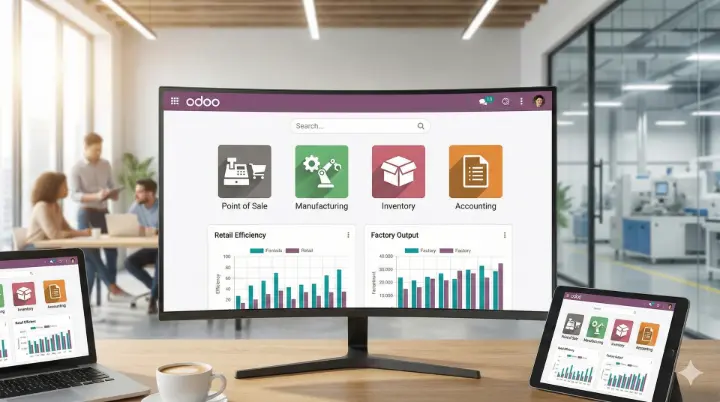
Why Choose Odoo Modules for Your Business?
Odoo modules are like building blocks. Each handles one job, like sales or stock. They connect seamlessly. No more app silos.
For retail, focus on fast checkouts and customer ties. For manufacturing, stress planning and quality. All modules update in real time. This cuts errors by 40%, per Odoo stats.
Key perks:
- Affordable: Open-source core; add enterprise for extras.
- Scalable: Starts small, grows big.
- Integrated: One login for all.
Top Odoo Modules for Retail Businesses
Retail means quick sales and happy shoppers. Odoo modules speed this up. They handle online, in-store, and stock in one spot.
1. Point of Sale (POS) Module
The go-to for cashiers. Turns any tablet into a checkout.
- Supports offline mode—no Wi-Fi? No problem.
- Takes cards, cash, or apps like Apple Pay.
- Syncs stock live to avoid oversells.
Benefit: Boosts sales speed by 25%. A coffee shop owner cut lines from 5 to 2 minutes.
Quick Setup:
- Install via Odoo Apps.
- Add products and prices.
- Test on a device.
2. Inventory Management Module
Tracks every item. From shelf to supplier.
- Real-time views across stores.
- Auto-reorders when low.
- Barcode scans for fast counts.
Benefit: Ends stockouts. One chain saved $10K yearly on overstock.
Pro Tip: Link to POS for instant updates.
3. CRM and Sales Modules
Builds customer bonds. Tracks leads to loyalty.
- Email campaigns from one dashboard.
- Quote builder with e-sign.
- Loyalty points for repeat buys.
Benefit: Lifts repeat sales 15%. Use for omnichannel—like app orders picked in-store.
2025 Update: AI predicts buy trends.
4. eCommerce Module
Sells online without hassle.
- Drag-drop site builder.
- Syncs with inventory and POS.
- Handles shipping and taxes.
Benefit: Grows reach. A boutique doubled web sales in months.
These four cover 80% of retail needs. Start with POS and add as you grow.
Top Odoo Modules for Manufacturing Operations
Factories juggle parts, machines, and deadlines. Odoo modules streamline this. From raw goods to finished packs.
1. Manufacturing (MRP) Module
Plans your builds. Core for makers.
- Creates work orders from sales.
- Manages BoM for recipes.
- Tracks machine time.
Benefit: Cuts delays 25%. A widget factory hit deadlines 90% of the time.
Quick Setup:
- Define products and BoMs.
- Set work centers (e.g., assembly line).
- Run a test order.
2. Product Lifecycle Management (PLM) Module
Tracks item changes. From idea to scrap.
- Versions designs and parts.
- Approves updates team-wide.
- Links to MRP for smooth shifts.
Benefit: Speeds innovation. Cut redesign waste by 20%.
Pro Tip: Great for custom orders.
3. Quality Control Module
Ensures top standards. Spots issues early.
- Checklists at each step.
- Auto-alerts for fails.
- Reports for audits.
Benefit: Meets regs like ISO. One plant dropped returns 35%.
2025 Update: IoT sensors flag defects live.
2. Product Lifecycle Management (PLM) Module
Tracks item changes. From idea to scrap.
- Versions designs and parts.
- Approves updates team-wide.
- Links to MRP for smooth shifts.
Benefit: Speeds innovation. Cut redesign waste by 20%.
Pro Tip: Great for custom orders.
3. Quality Control Module
Ensures top standards. Spots issues early.
- Checklists at each step.
- Auto-alerts for fails.
- Reports for audits.
Benefit: Meets regs like ISO. One plant dropped returns 35%.
2025 Update: IoT sensors flag defects live.
4. Maintenance Module
Keeps gear running. Schedules fixes.
- Tracks breakdowns and parts.
- Predictive alerts via AI.
- Ties to MRP for downtime logs.
Benefit: Uptime jumps 15%. Less surprise stops.
5. Purchase Module
Sources smart. For raw needs.
- Vendor bids and auto-orders.
- Tracks deliveries.
- Integrates with inventory.
Benefit: Lowers costs 10-15%.
These modules form a tight chain. Use MRP as your hub.
Shared Modules: The Glue for Retail and Manufacturing
Some modules serve both worlds. They link sales to shop floors.
- Accounting Module: Auto-invoices from POS or orders. Handles taxes. Benefit: Clean books, quick reports.
- HR Module: Timesheets for shifts. Payroll from hours. Benefit: Fair pay, less admin.
- Project Module: Tracks custom jobs. Gantt views for timelines. Benefit: On-time delivery.
Integration Tip: Enable "multi-company" for hybrid ops, like retail with in-house making.
[Internal link suggestion: Link to your "Odoo Accounting Basics" guide.]
How to Implement Top Odoo Modules: A Step-by-Step Guide
Don't just read—act. Here's how to start.
- Assess Needs: List pains (e.g., stock errors). Match to modules.
- Install Odoo: Free community version or paid enterprise.
- Configure: Use wizards for basics. Test in sandbox.
- Train Team: Short videos (1-2 hours per module).
- Go Live: Migrate data slowly. Monitor for a week.
- Customize: Add apps from Odoo store for extras like AI forecasts.
The Inventory module. It offers real-time tracking and auto-reorders. Links to POS and MRP.
Via MRP and PLM. They plan production and track quality. Cuts waste and speeds output.
Yes. Offline mode and low cost make it ideal. Handles 100+ transactions daily.
Omnichannel sales, loyalty tools, and stock sync. Boosts efficiency 20-30%.
Absolutely. Routes stock smartly across sites.